


How Can We Help?
Slo-Pitch Ontario Winter-Spring Membership Role
1.1 Purpose of this document
The Purpose of this document is to record the expected workflow and business case rules around the Winter-Spring User role in the SPO MRS.
1.2 Seasons
A season generally starts early Jan and runs for one full year. Members of SPO are required to become a member during this time for insurance and access to the SPO tournament structure and Provincial Championships. Members are required to become members again every Season.
2. User log in and Registration
Assumption: User has already created an account in the SPO MRS (new or returning user after a roll over) and has signed the current seasons waivers and is now being presented with Membership Options.
2.1 Select membership Type
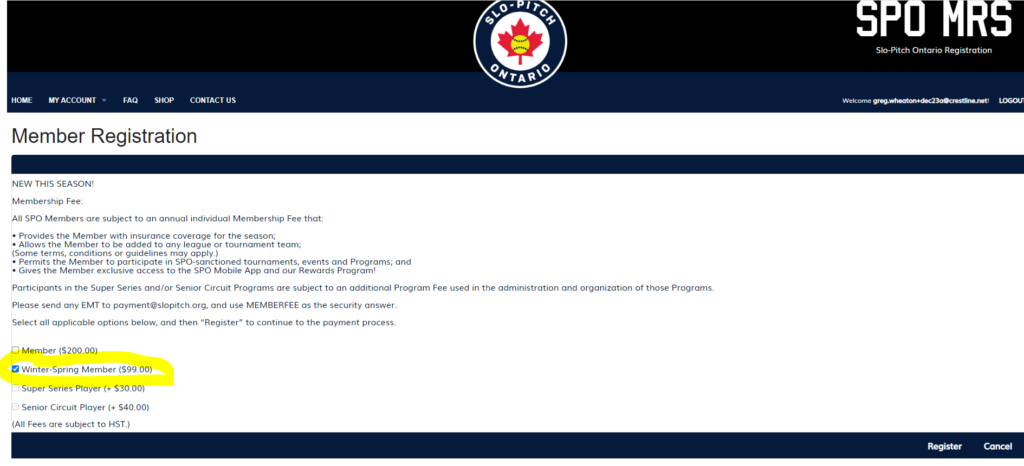
Starting in the 2022 Season, users will have the option of selecting a new user role called “Winter-Spring Member”. The intent of this role is to provide users with a lower cost option should they wish to participate in SPO related events without having to purchase a full SPO membership. The business model is to provide membership privileges from the start of the season (typically early Jan) up until the start of the generally accepted Season (April / May). This would allow users full membership privileges during the winter and springs months for indoor and dome ball leagues. This membership would expire before the start of the outdoor season and users who would like to continue in the program would then have to upgrade to a full SPO membership.
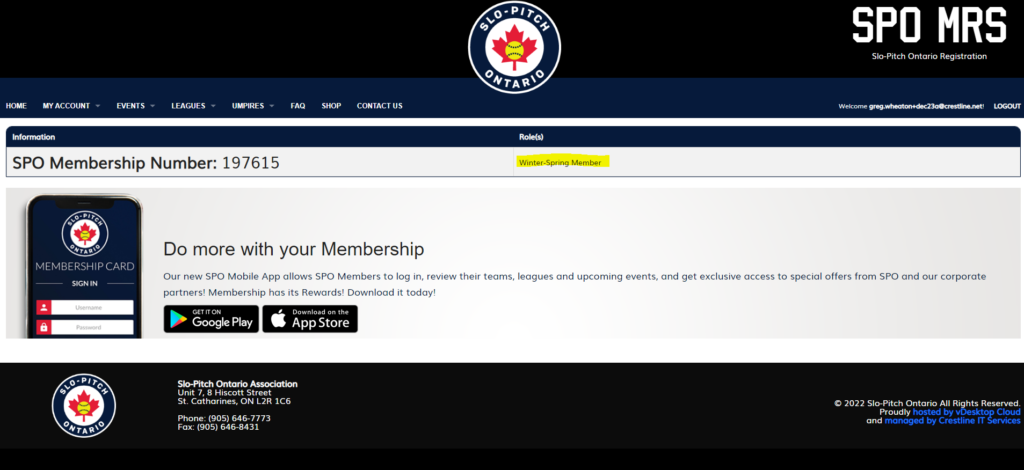
Users selecting Winter-Spring member would then be asked to checkout and pay for that role via CC or E-transfer. Once that transaction has been completed, they would have time limited full membership privileges
2.2 Upgrading to Full Membership
If a user decides they would like to upgrade to the Full SPO membership for the entire season they can click on “My Account”, “Add Additional Roles” and select “Upgrade to Full Membership”.
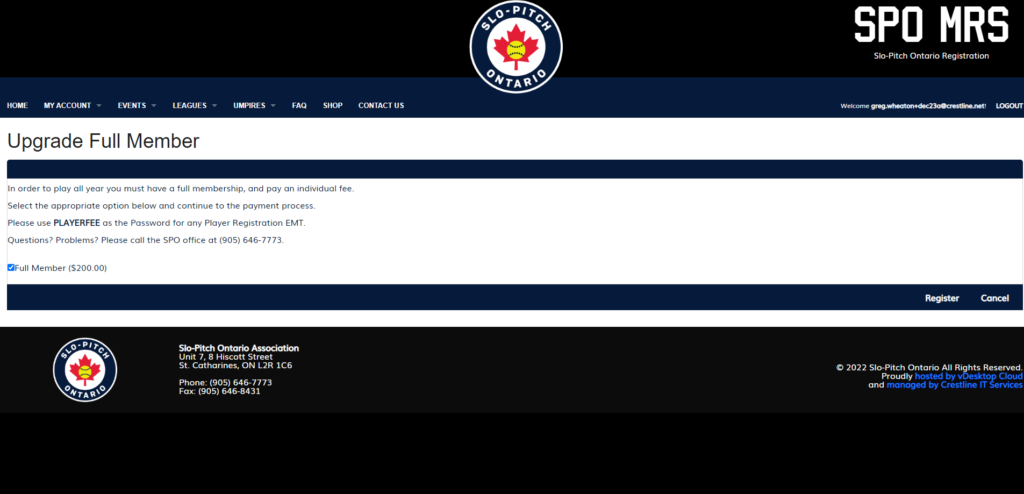
The user would then pay the full membership fee which will effectively “delete” the Winter-Spring” role from their profile and replace it with “Member”. That account will now be valid for the remainder of the season.
2.3 Expired Membership
If the user decides not to upgrade to the full SPO membership, when SPO decides to “expire” all Winter-Spring roles (see section 3.3) The role will be put into an “inactive” status and if that user logs back into the MRS they will have to sign up as a member to continue / have any access.
3. Role Administration
3.1 Setting the Winter-Spring Role
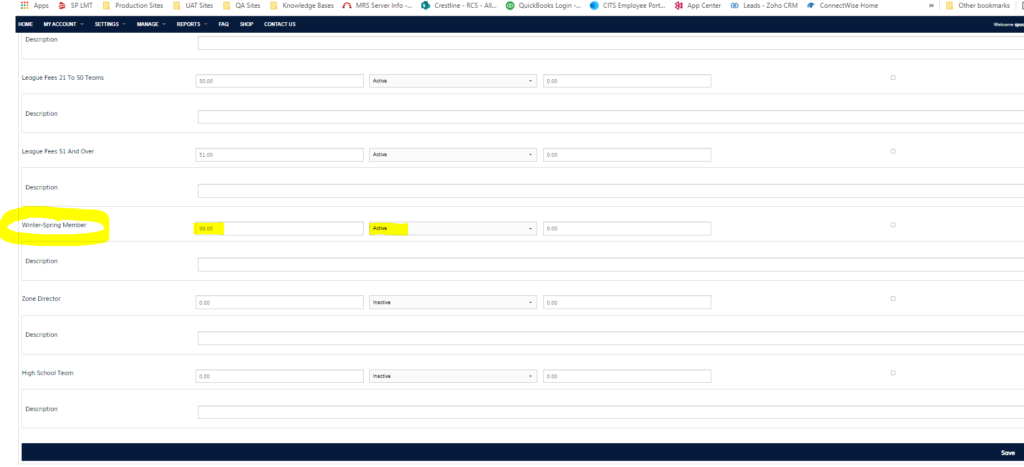
As an administrator you set the fee for the Winter-Spring Role under Setting / Registration fees. At the beginning of each season make sure its set to Active and has the appropriate Value.
3.2 Viewing Winter-Spring Users
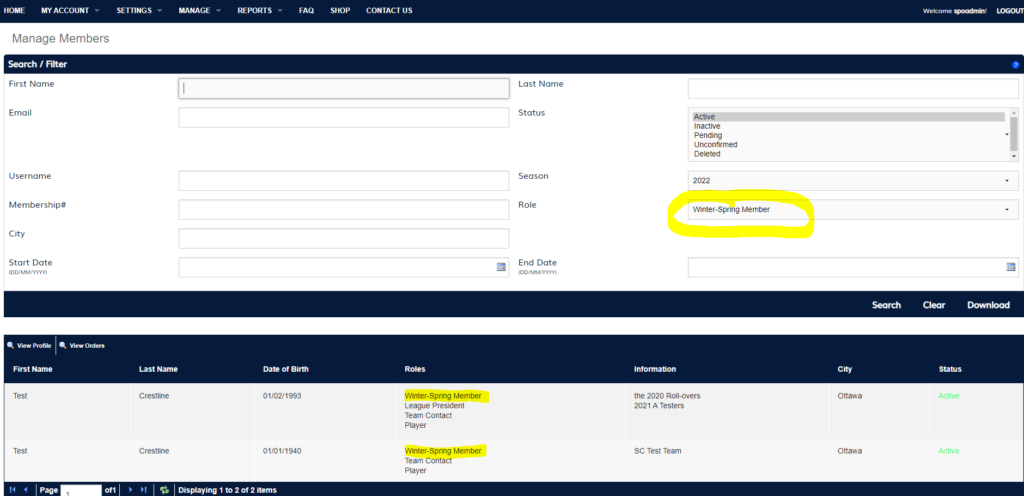
Admin under the Member search option will have the ability to view all user accounts that have the Winter-Spring Role.
Note: this Search will only work for Winter-Spring Roles that are active in a current Season. If that role has expired and the user hasn’t upgraded their membership, the account will still show active (since they signed the waivers) but the Winter-Spring role will no longer show up and the user will be unable to login and access their information until they become members again.
3.3 Expiring / Deactivating the Winter-Spring Role
As an administrator under Settings / Seasons: the following is the process for expiring all currently active Winter-Spring user roles.
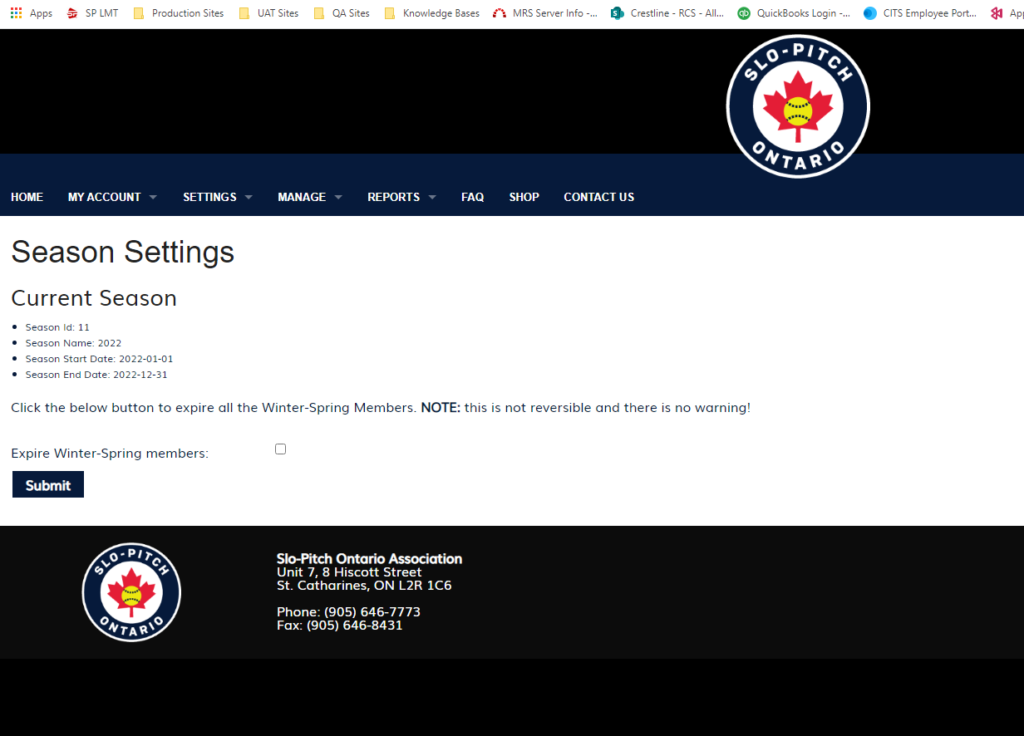
The Page will detail the current Season, Season name, when the season started and the “tentative” season end date. There will be a Submit button at the bottom of the page which will set all currently active “Winter-Spring” users to an expired status when pressed and the “Expire Winter-Spring members” checkbox has been checked.
Important note, this process cannot be undone.
In addition to expiring all these roles, under Settings / Registration fees the Winter-Spring user role will also be set to inactive so no new users can select that role.
3.4 Re-activation of Winter-Spring Role (in Season)
If the SPO System Administrator had expired all Winter-Spring users and wanted to turn the role back on again within the current season, all they would need to do is go in under Settings/Registration fees and change the status from inactive to active. This would make the role selectable by any new or returning users who are logging in for the first time in each season.
The process of activating and de-activating the Winter-Spring role can happen anytime during an existing season.
4. Season Rollover
4.1 End of Season
As with all other user roles, if a Winter-Spring role is still in an active state when a season ends as part of a Season roll over it will be set to inactive on the Setting/Registration Fees page and all users who had that role would also be set to inactive and will be required to log in and purchase one of the membership roles again.
Note: this would not be the typical usage of this role as its meant to be used is the early part of the season and would be expired / upgraded long before a season rollover would be scheduled to take place.
4.2 New Season
Any user who only had the Winter-Spring Role in a previous season will still have all the same available membership options as all other returning members on logging in again for the first time that season. Available roles will be based on what has been configured by SPO Administrators. There are no limiting conditions based on a previous year’s membership type.